

Integrations and APIs
How to connect forms, CRM, WhatsApp, and email so you don't lose sales opportunities
A practical guide to integrating web forms, CRM, WhatsApp, and email, improving sales follow-up, and preventing leads from getting lost across spreadsheets, inboxes, and chats.
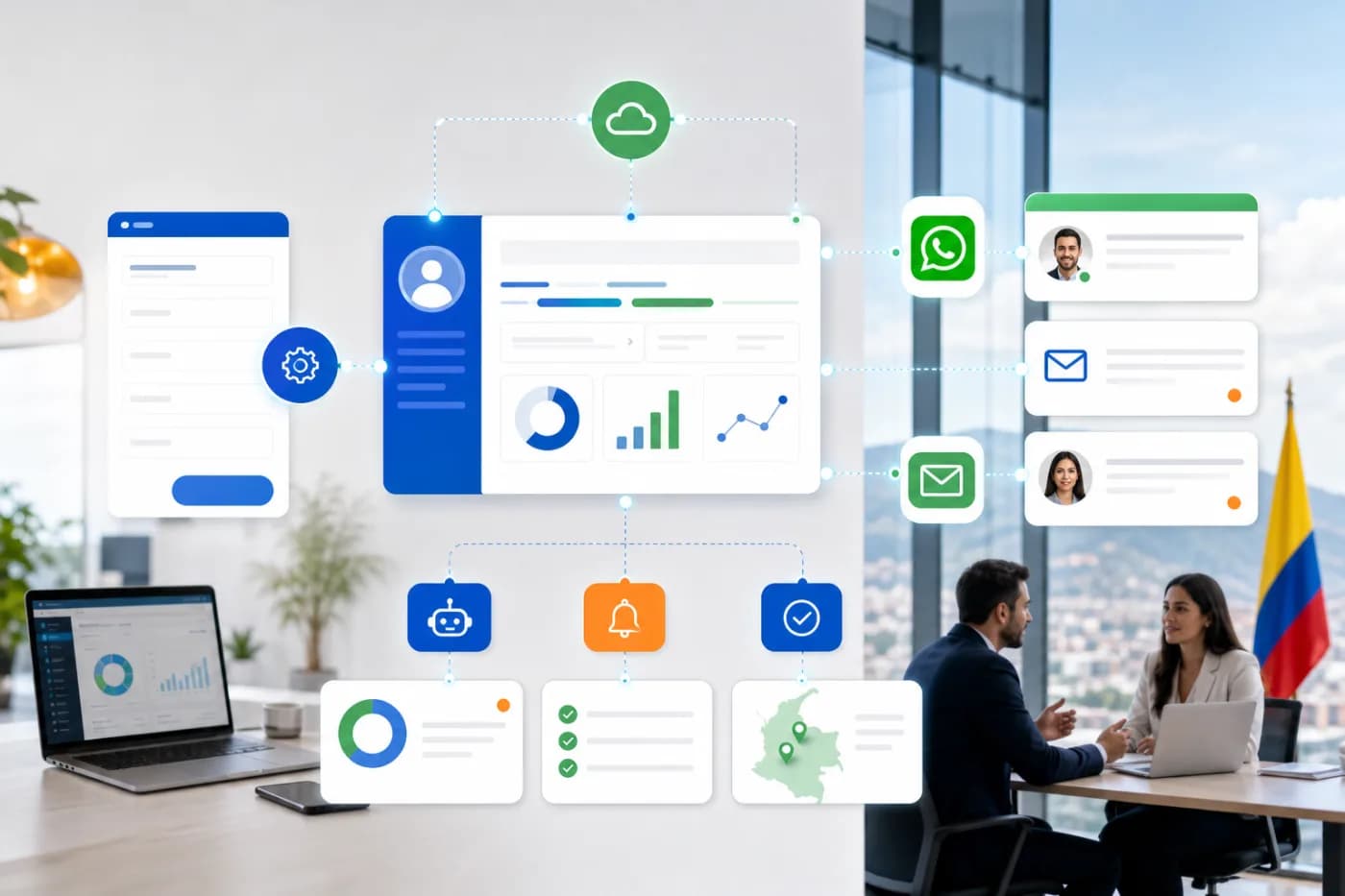
A web form can capture a sales opportunity, but by itself it does not guarantee that someone will respond on time. When the data remains in an email, spreadsheet, or chat without follow-up, the team loses context and the company loses its ability to respond.
The solution is not simply to install more tools. It is to design a connected workflow between web forms, CRM, WhatsApp, and email, with clear rules for recording, assigning, notifying, and measuring each lead. In this article, we explain how to do this through API integrations and lead automation.
What should happen when a lead arrives
Before choosing platforms, you need to define the sales process. A basic, well-designed workflow could look like this:
- A person completes a form on the website.
- The system validates the data and prevents incomplete or duplicate records.
- The lead is created or updated in the CRM with its source, service of interest, and contact details.
- The CRM assigns the opportunity to an owner based on rules such as city, service type, or company size.
- The team receives a notification by email or WhatsApp Business, depending on the level of urgency.
- The contact receives an initial response, and the next sales step is recorded.
- The company can check the lead's status and measure what happened after the form was submitted.
This workflow can be adapted for professional services firms, agencies, technology companies, consultants, construction companies, or B2B providers in Colombia.
The architecture of an API integration
An API integration allows two or more systems to exchange information in a structured way. For example, the form sends the data to an intermediary service; that service validates the information, queries the CRM, and creates or updates the corresponding record.
In practical terms, the architecture usually includes four components:
- Source: the web form, landing page, portal, or campaign.
- Integration layer: a custom API, webhook, or automation platform that transforms and routes the data.
- Destination systems: CRM, corporate email, WhatsApp Business, or other internal tools.
- Control and observability: error logs, retries, alerts, and traceability for each operation.
The integration layer is important because it prevents you from relying on fragile connections between tools. It also allows you to apply business rules, protect credentials, control permissions, and change one system without rebuilding the entire process.
How to connect web forms to a CRM
The first decision is to define what information the sales team actually needs. A form should request the information needed to qualify an opportunity, not turn the conversation into an interrogation.
In addition to name, company, email, and phone number, it may be useful to record the service of interest, city, company size, approximate budget, or expected timeline. These fields should correspond to existing properties in the CRM so the information does not end up in disorganized notes.
Recommended validations
- Validate the email format and phone number.
- Normalize phone numbers with a country code when applicable.
- Define required fields and clear messages for the user.
- Detect possible duplicates by email, phone number, or company identification.
- Save the lead source: page, campaign, referral, or channel.
- Record the date and time received to measure response times.
The integration must account for what happens when the CRM does not respond, when a field is empty, or when the contact already exists. Without these rules, an automation can create duplicates or cause a lead to disappear without an alert.
CRM, WhatsApp, and email: what should be automated
Connecting CRM, WhatsApp, and email does not mean sending automated messages to everyone. Automation should support the team, not replace sales judgment.
A reasonable setup could include:
- An internal email when a high-priority lead arrives.
- A task in the CRM with a deadline and assigned owner.
- A WhatsApp Business message when the user has authorized that channel and the case warrants it.
- An email response confirming receipt of the request.
- Internal reminders if no action is recorded within the defined time.
- Automatic status updates when the sales representative responds or schedules a meeting.
On WhatsApp, you must follow the platform's policies, use approved templates when applicable, and obtain the user's consent. It is also useful to distinguish an operational notification from a sales message. Not every lead should receive the same communication or use the same channel.
Common mistakes when automating leads
Connecting tools without designing the process
An integration can move data correctly and still fail to solve the problem. If no one knows who handles the lead, how quickly they must do it, or what status they need to record, the bottleneck remains.
Sending all the information to every channel
Copying sensitive data into emails, chats, and spreadsheets increases operational risk. It is better to define what information each team needs and keep the CRM as the primary source.
Ignoring duplicates and errors
APIs can return errors, usage limits, or incomplete responses. Every important automation needs logs, controlled retries, and alerts so a failure does not go unnoticed.
Not measuring the workflow's results
Recording a lead is not the same as managing an opportunity. It is useful to review how many forms arrived, how many leads were contacted, how long the first response took, and at what stage they stopped progressing.
Depending on one person
The process logic should be documented. If only one employee knows how the connection between the website, CRM, and WhatsApp works, any team change can interrupt operations.
Checklist for a reliable sales integration
Before putting the workflow into production, review these points:
- Is the complete journey from the form to the close defined?
- Does the CRM have clearly configured fields, stages, and owners?
- Is the source of each lead identified?
- Are duplicates, empty fields, and incorrect formats controlled?
- Is there a policy for using email and WhatsApp?
- Are errors recorded and alerts generated?
- Is there a retry mechanism that does not create duplicate records?
- Does the team know what to do when it receives a notification?
- Can process statuses and response times be reviewed?
- Does the documentation support maintaining the integration after launch?
When to talk to a developer
A simple automation can be handled with application-connection tools. However, it is a good idea to talk to a developer when there are specific business rules, multiple lead sources, sensitive information, a high volume of records, or systems that do not connect natively.
It is also worth seeking technical support if you need a custom API, an internal CRM integration, inventory or calendar synchronization, a tracking dashboard, or WhatsApp Business connected to business logic. In these situations, a custom solution may be more stable and controllable than accumulating isolated automations.
The work should not be limited to writing code. It includes reviewing the process, defining permissions, documenting the data, configuring test environments, and leaving monitoring mechanisms in place. This allows the integration to evolve when the CRM, website, or team needs change.
Frequently asked questions about CRM, WhatsApp, and email
Can any web form be connected to a CRM?
In many cases, yes, through an API, webhook, or integration platform. Feasibility depends on the capabilities of the form and CRM, as well as each system's security rules.
Which should be the primary source of information: email or the CRM?
For managing opportunities, the CRM should be the primary source. Email can be used for notifications and conversations, but it should not be the only place where the lead's history is recorded.
Can WhatsApp automatically update an opportunity's status?
Yes, when an authorized integration is used and you define how to interpret responses or events. Even so, some changes should require validation by the sales representative to prevent incorrect statuses.
Is it better to use an automation tool or develop a custom API?
It depends on the complexity, budget, level of control required, and expected stability. Tools may be enough for simple workflows; a custom API provides more control when there are specialized rules and systems.
What information should I request in a B2B web form?
Ask only for what is needed to contact and qualify the case: contact details, company, service of interest, and basic context. The fields should help the sales team without creating unnecessary friction for the user.
Connect your sales channels with a solid technical foundation
Web forms, CRM, WhatsApp, and email work better when they are part of one measurable, documented process. A good API integration does more than send data: it validates, assigns, notifies, records errors, and shows what happened with each opportunity.
If your company receives leads through several channels and follow-up depends on manual tasks, let's review the process. Talk to David Campos to design an integration that fits your operation.